featured slide

Bloggerized by Nauman Khan

featured slide

Bloggerized by Nauman Khan

featured slide

Bloggerized by Nauman Khan

featured slide

Bloggerized by Nauman Khan

featured slide

Bloggerized by Nauman Khan

Thursday, April 4, 2013

How to Set Up Your Own Private Cloud Storage Service in Five Minutes with OwnCloud


With so many services like iCloud and Dropbox getting hacked these days, it's no surprise that more people want to pull their data off the cloud. Instead of missing out on those great syncing features, though, you can create your own cloud storage service that you control with a service called own Cloud. With it, you'll get syncing files, notes, calendars, and more. The best part: it only takes about five minutes to get it set up.
OwnCloud is free and open source software that operates as a very simple way to set up your own syncing, Dropbox-like cloud storage system on your own server or web site. It's robust enough that it has replaced Dropbox for me in all except a few choice cases. It's also quick and easy to set up, and doesn't require advanced technical knowledge. OwnCloud is about as powerful as Dropbox, but it also allows people to make and share their own apps that run on ownCloud including text editors, task lists, and more. That means you can get a little more out of it then just file syncing if you want.

What You'll Get

At the core of it, ownCloud offers up super easy file syncing from your desktop to the cloud. To get an idea of how it works, play around with the live demo here (it looks like the live demo might be down at the moment), and see a full list of its features here. Like Dropbox, you can access your files from anywhere, sync data, and share files with others.

Beyond that, you also get a music player built directly into ownCloud, a simple place to store contacts, a task manager, a syncing calendar, a bookmarking service, and a robust photo gallery. You'll be able to sync ownCloud with almost any desktop or mobile calendar and contacts app. That means if you want to ditch the likes of iCloud, ownCloud makes it easy to do. A recent update also added a simple install method so anyone can start using ownCloud right away.

What You'll Need

You don't really need much to get started with ownCloud. Just gather up:
  • A web host that supports PHP5 and MySQL (or SQLite): This might sound a little jargony, but all it means is that you need to sign up for a service like Dreamhost (if you haven't already). If you already have a domain name like http://www.yourname.comthrough a web host (and you should), you can probably install ownCloud in a couple minutes. It sounds complicated, but you don't actually need to deal with things like PHP and MySQL for the simple installation of ownCloud. It does it all for you automatically. Just make sure your hosting service supports them.
  • A copy of ownCloud Server 5: You can install ownCloud in a variety of ways, but for our purposes we'll stick the simplest method: the web installer. If you know how to put a file onto your web site, you can install this. You'll just need to upload one file to your web host.
  • A URL for remote access: Since you'll likely want to tap into ownCloud from anywhere, you'll need a URL for doing so. If you don't already have a domain name, you can buy one, but if you do it's incredibly easy to set up ownCloud in a subdirectory of your site.
The nice thing about ownCloud is that it's compatible with just about any server you can imagine. We're going to stick with the simple web installer that works with an online hosting service, but if you want full control, it's easy to install on a Linux machine in your house, anumber of service providers offer one-click installs, and hosts like Dreamhost even provide their own installation guides. You also want to take a look at your web host's Terms of Service to make sure they don't outrightly ban setting up your own cloud storage on their servers.

Initial Setup and Installation

As we mentioned early on, you have a lot of options for how to install ownCloud. For this guide, we'll keep it as simple as possible and use the web installer. With the web installer ownCloud automatically creates everything you need so you don't need any special skills to get it set up (if you have multiple users who will access ownCloud, it's recommended that you manually create a database):

  1. Download and save the web installer to your computer.
  2. Upload the setup-owncloud.php file to your web space using your host's web interface or an FTP app (our picks forWindows, Mac, and Linux are a good place to start if you don't have one).
  3. Enter the URL of the setup file into your web browser. It should something likehttp://www.yourdomainname.com/setup-owncloud.php.
  4. Follow the basic onscreen instructions to install ownCloud. After a couple of minutes it'll redirect you to the login page.
That's it. It's incredibly easy to set up as long as your web server meets the basic requirements listed in the first section. If not, ownCloud's guide for manual installations covers just about every other instance you could possibly run into.

Set Up Your Desktop and Mobile Sync

Now that you have ownCloud installed on your web server it's time to set up the desktop sync so the files in ownCloud are the same as on your computer. For this, you'll need to install the desktop client (Windows,Mac, or Linux).

From here, setup is pretty simple:
  1. Open up the ownCloud software on your computer, and select "configure."
  2. Add the URL of your ownCloud server, and your login credentials.
  3. Now, you need to select the files and folders you want to sync. Click "Add folder..." and select a folder on your computer. All files here will now upload and sync automatically to ownCloud. You can add as many folders as you like.
As with Dropbox, you can also simply drag files into the web interface to upload them and they'll be synchronized both locally and in the cloud, and you can share files with friends by selecting the "share" option when you mouse over a file.
For the mobile apps (Android/iPhone), you'll follow the same instructions to point the app to your ownCloud directory, then enter in your username and password. The mobile apps are notably barebones, but they function well enough for accessing files.

Sync Up Your Calendar, Address Book, and Music

Now that the basic file syncing is out of the way, it's time to get all your other stuff synced up. This means synchronizing your calendar, address book, and music.

Sync Your Calendars

If you use a calendar app that supportsCalDAV, you just need to point it to your ownCloud installation:

  1. Click the Calendar icon on the right side.
  2. Click the gear icon in the top right.
  3. Copy down the URL for your calendar (most calendars can access the simple URL, but OS X and iOS require a slightly different URL)
Now, just open the settings of your favorite calendar app, and add your account in the CalDAV section. All your appointments will be dumped into ownCloud and synced across any other devices you connect to it.

Sync Your Contacts

Similar to the Calendar, you can easily import and sync up your address book with ownCloud:

  1. Export your contacts from your address book into a VCF file.
  2. From ownCloud, select the "Contacts" sidebar, and click the gear in the bottom left corner.
  3. Click "Import" and select the VCF file you want to upload.
It will take a few minutes to get your contacts uploaded, but once they're up, you cansynchronize them with any address book that supports CardDAV (most do).

Set Up a Music Server

One of the most interesting things you can do with ownCloud is set up a personal cloud server for all your music. Just upload some MP3 files into ownCloud, and you immediately have access to them alongside a web player. That alone is useful, but you can also set up a desktop client to access those files.

Your ownCloud server is compatible with a few different music apps, but we likeTomahawk because it's simple, cross platform, and suprisingly powerful. Here's how to set up Tomahawk to read music from ownCloud:
  1. From the ownCloud web interface, click your username and select "Personal."
  2. Copy down the URL listed as Media (it will read something like:http://yourdomain/owncloud/remote.php/ampache)
  3. In Tomahawk, head to the Preferences (Tomahawk > Preferences), and select "Services."
  4. Scroll down and select "Ampache."
  5. In the dialogue box that opens, enter in your ownCloud username and password, followed by the URL you copied above.
Now, all the music you have stored on ownCloud will be playable in Tomahawk. If you're not a fan of the simplistic web player, Tomahawk works great.

Add Apps and Extend OwnCloud's Power

Now it's time to extend ownCloud's functionality further with apps. If you click your username from the ownCloud web interface and select "Apps" you're taken to a list of installable applications. You can also browse through a few more here.

To install any of these apps, just select the app, and click "enable." After a few moments, it will be installed and you'll find a new icon on the right panel. As you'd expect, the apps range in their usefulness, but here are a few I found helpful:
  • Journal: This is a simple journal and notes app that works with the Tasks app and the Calendar app. It also supports syncing if you're using a small selection of different apps on Linux or Android.
  • Tasks (available within ownCloud): Tasks is a simple to-do list that syncs with the calendar or stands on its own.
  • Bookmarks (available within ownCloud): Bookmarks turns ownCloud into a nice little cloud-based bookmarks manager, complete with tagging, filters, and a bookmarklet to easily bookmark any page.
  • Roundcube: Roundcube adds an email interface directly into ownCube provided your mailserver supports Roundcube and IMAP.

The nice thing about ownCloud is that with the recently added web installer, pretty much anyone can get it up and running on their own web host in a matter of minutes. Once you're set up, you can extend that functionality as much as you want, or just use it as a cloud-based file syncing service. You won't find the same amount of in-app support on mobile devices as you would with Dropbox, but as a free, private cloud server ownCloud does its job very well.


Wednesday, January 16, 2013

Hyundai HCD-14 Genesis concept unveiled at Detroit Auto Show


Hyundai HCD-14 Genesis concept profile

The HCD-14 Genesis is meant to push Hyundai further into luxury territory with sophisticated styling and 3D gesture recognition technology.

Hyundai HCD-14 Genesis front three quarter

The eye tracking feature allows the driver to select a function, while the 3D system allows him or her to use minimal gestures to make their selection.

These new technologies help the driver control audio, navigation, HVAC, and smartphone connectivity functions. Combined with a head-up display, Hyundai says eye tracking and gesture recognition keep the driver’s eyes on the road the majority of the time.

This may be a concept car, but Hyundai decided to make it drivable as well. However, the drive train is more realistic than the styling or futuristic infotainment interface. Under the hood is the same 5.0-liter Tau V8 from the Genesis 5.0 R-Spec and Equus. It’s mated to an eight-speed, paddle-shifted automatic transmission.

To give the HCD-14 Genesis a sporty feel, Hyundai also gave it five-link front and rear suspension and performance tires. Electronic nannies include a yaw control system and multi-mode power steering.

The HCD-14 is just a concept car, but seeing as it shares its name with Hyundai’s current premium sedan, it seems likely that certain features will make it onto future production cars. The styling and infotainment system are the standouts, but whether they can make it to production undiluted is the big question. First, Hyundai should do something about that grille.

BB10 phones expected to release during the first quarter of 2013.


BB10 Gets Security Nod for Government Use

RIM is ready for active duty. 
Photo: Roberto Baldwin/Wired
While the iPhone has the app market wrapped up, and Android touts its customization bona fides, BlackBerry has traditionally been the security phone of choice for businesses and super spies. RIM can continue to ride the security wave with news that its unreleased platform is ready for government duty.
On Thursday RIM announced that BlackBerry 10 smartphones and enterprise servers had received FIPS (Federal Information Processing Standard Publication) 140-2 certification from the National Institute of Standards and Technology (NIST). In order to pass, a device must have certified encryption algorithms when data is transmitted or the phone is at rest.
One of the features RIM has been most proud of is its security. Thursday’s announcement is good news for a company that has been struggling to remain relevantin the post-iPhone era. This is the first time a RIM product was certified before its release. Government agencies can start using the devices as soon as they become available on the market.
RIM is expected to release new BB10 phones during the first quarter of 2013.

Cadillac unveils the ELR plug-in in Detroit


The technology has already been proven in the Chevy Volt, and the ELR’s luxury appointments should soften the blow of the high price of that technology.

The Cadillac Cimarron was possibly the lowest point in the entire 111 year history of Cadillac. Their decision to sloppily re badge a Chevy Cavalier and then double the price was the supreme example of everything that was wrong with the American automotive industry for years to come. Cadillac has, in recent years, done a much better job of distinguishing its brand from the rest of GM, but those of us who remember the Cimarron still got nervous when Cadillac announced it would be building a plug-in vehicle based on the Chevy Volt. The Convert concept, which the new plug-in was based on, looked promising, but it wasn’t until the debut of the ELR production model at the Detroit Auto Show that fears of a plug-in Cimarron could be laid to rest.

To start with, the ELR doesn't just have a different body, it has a different body style altogether; it’s a coupe, not a sedan. And although we certainly wouldn't call the Volt ugly, the ELR is definitely more attractive. The drive train is the same as the Volt’s, with an electric motor and battery pack that can carry the car for 35 miles on a single charge, and then there is a 1.4-liter range extender. With a 240V charger, the battery can be fully charged in about 4.5 hours. Cadillac hasn't set a price for the car yet, but with the huge void in the market between the $39,000 Volt and the $100,000+ plug-in vehicles like the Fisker Karma, the business case for a more luxurious and pricier car to slot in above the Volt is pretty clear. The ELR is a solid contender, and it’s not difficult to imagine that it could be one of the more popular plug-ins around.

Facebook launched Graph Search


FACEBOOK Takes On Google, But Private, Personalized, Social Search Has No Clear Winner Yet


Screen Shot 2013-01-15 at 18.57.55
Facebook launched Graph Search today, its own version of a private, personalized social search engine. It’s somewhat of a competitor to Google’s “Search Plus Your World” – Google’s more recent take on blending personal data with that of the greater web. Although Facebook CEO Mark Zuckerberg was careful to frame it as not being a web search product, that statement was not entirely accurate. It is web search, after all – it’s search and it’s on the web. It’s just not web search as we know it.
Don’t be mistaken – these two companies, Google and Facebook, are now battling for your private data, and to some extent they’re both betting on personalization as the future of search.
Facebook, as we know, has over 1 billion users, and today noted that it has over 240 billion photos as well, and “more than a trillion connections.” In other words, it’s home to a wealth of private data, which Google can’t know about and index. A vast landscape built in Google’s blindspot. That’s a niche it would be ignorant to ignore, obviously.
Whether that niche is the definitive future of search, however, is yet to be proven.
Facebook Graph Search, the company says, is rolling out slowly. It will leverage the social network’s own private data, honoring users’ privacy settings in the process of building this new search engine. Some things aren’t yet included, like individual Facebook posts and Open Graph actions (like song listens), the company says. But they’re coming.
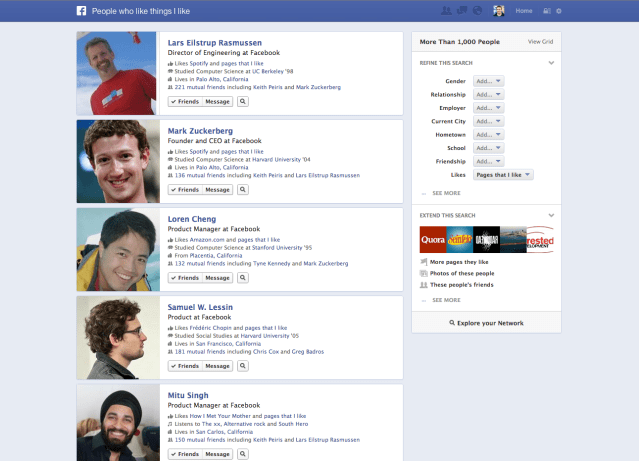
Screenshot-PeopleWhoLikeThingsILike
It will make Facebook far more usable, and will therefore suck up even more of users’ time from Google Sites, which will be another blow to Google’s ads business.
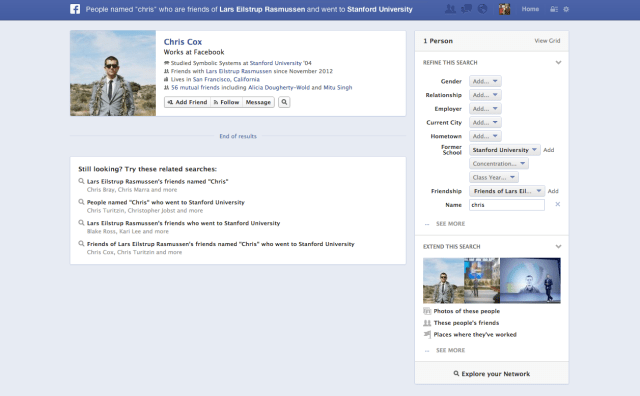
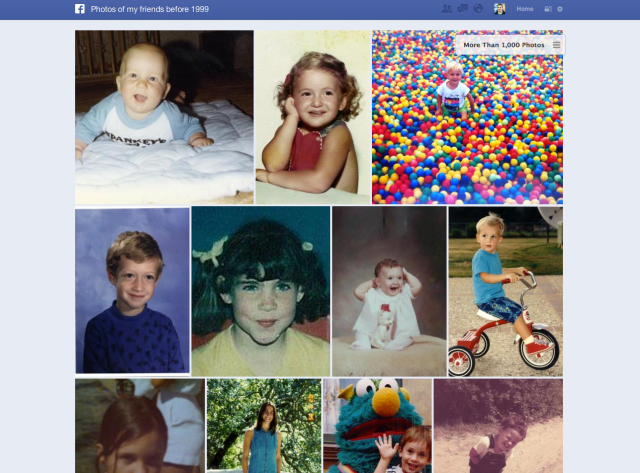
Facebook users will be able to search for friends, photos, restaurants and businesses nearby, games and music friends play, photos friends like and more. Much of this you can do on Facebook today, it just hasn’t been well-organized. Facebook currently has a search interface, but Graph Search will re-envision Facebook Search for a more powerful combinations of various search queries – “restaurants in New York liked by chefs,” “cities my family have been to,” “photos of friends from before 1999,” etc. Facebook Search is all about exploring your personal social connections, and those across Facebook.
Screenshot-PeopleNamedChris
This is a major step forward for defining what Facebook is to users: a social network turned search engine. And while it’s true that Facebook has leveraged a wealth of private data to build its engine on top of, it’s not the only company which is capable of doing so. Yes, Google may be starting from the other direction (search -> social instead of social -> search), but it’s not powerless here, despite the giant, and growing, private web behind Facebook’s doors.
Google, too, has been building its own social graph of sorts for its user base. While those visiting the destination site Google Plus may chalk up Google’s social efforts as that of building a Facebook clone with a few Google-fied bells and whistles, like video Hangouts, for example, Google’s true social efforts lie in unifying its user data across all its properties and services. Over the past year or so, Google has shut down unneeded and underused services (yes, including social search startup Aardvark!). It has combined its various user Privacy Policies into one, and have made users’ Google login the identification they use everywhere on Google from checking email to watching YouTube to searching for answers. It has streamlined Google and added a social layer to all of it.
YouTube is a pretty big social network, too, when you think about. 800 million monthly uniques. And Google hasn’t even fully realized the potential of switching on social on its mobile install base, via Android.
The company has access to other private data, too, which recently became available for public search tests. In August, it began letting users search their Gmail messages using Google.com. December, it then enabled an opt-in feature that lets users search for their online purchases, reservations, and other events using Google.com. The trick here is being able peer in users’ inboxes, and identify messages like order confirmations and receipts. It only feels vaguely intrusive because we believe our email is private. It’s not.
And Gmail, one could argue, is a social network filled with far more practical data for searching than “which photos my friends liked.”
Yet when it comes to the less practical – those photos, for instance – Facebook has the clear edge. 240 billion photos is just massive scale. Google, meanwhile, has let its Picasa photo-sharing service stagnate, confusingly, while also offering Google Plus Photos in its main social product. It’s time that Google stepped up its game on this front, and begin to merge the two properties properly, and transition users. (As a side note, Google offered instant (automatic, background) photo uploads from mobile a year and half before Facebook did. It also now has a dedicated easy upload app for YouTube.)
Photos could easily be Facebook’s battle to win.
As for the other data – venues suggestions and recommendations, travel ideas, etc. – well, remember that Google bought Zagat in 2011. Yes, Google saw this whole thing coming. Who hasn’t? Google is still making good on that purchase, too, having only recently relaunched Zagat on mobile. It has also merged Google Places (its business listings) into Google Plus Local. In Google’s preferred vision of the future, you might search for a restaurant, dine, rate and review the meal, and pay the establishment, all on Google. This could happen. That’s a lot of proprietary data, too.
Perhaps the biggest reason of all as to why the search battle is just now beginning is because we don’t yet know that search built on social search will definitely win long-term. Does social show early progress, in terms of Facebook ads, and specifically Exchange Ads? Yes it does. Can it transition that to mobile? Also possible.
Social search, likes, recommendations, etc., however, are built upon a potentially flawed idea: that our friends know best. They do not. Not always. Some friends have different tastes, and different interests. And some have just poor taste, let’s be honest. Does the fact that a friend bought a G&E washer mean I should too? (Maybe it was just on sale.) Does a friend’s check-in at Chez Louie equate to a recommendation? (Not without their accompanying rating or review. The food may have been terrible.) My friend went to Uruguay – should I consider that for my vacation? (They may have hated their hotel, who knows?).
A check-in, a place, a photo is not an answer. There’s more data needed here.
Then what about Facebook Likes? Sadly, Facebook advertisers have corrupted that data – “like our page for a coupon or deal!” Okay, liked. Hmm, now does the need for a discount mean a recommendation for a brand, though? That becomes less clear the more promotions are run.
Screenshot-PhotosOfFriendsBefore1999
While building a graph around what our friends and network is doing is an obvious no brainer for Facebook, it’s not necessarily the “next new thing” for search.
And if social is not the future of search, or if it’s only one small part, where then, is search going?Real answers. Facebook alluded to this in its announcement, saying exactly that: Graph Search is about answers, not links. But it doesn’t yet really have them.
Google is building its own answers engine too, however. It launched Knowledge Graph Search last year, which now delivers answers to fact-based questions. It launched a predictive, personalized search interface called Google Now on mobile, which knows what you need to know…and before you know you need to know it. That’s pretty disruptive.
Facebook is welcome entrant in search, but the games aren’t over just because it finally stepped onto the field.

Saturday, January 5, 2013

Five things Microsoft must do for Windows 8 in 2013


Microsoft's ambitious Windows 8 gamble may have launched this past October, but it's 2013 that will make or break the new operating system. I have five recommendations that Microsoft should implement sooner rather than later to keep Windows 8 from going the way of Vista.
Make the case for Windows RT
"That's right, it filets, it chops, it dices, slices, never stops, lasts a lifetime, mows your lawn, and it mows your lawn and it picks up the kids from school..." --Tom Waits, "Step Right Up"

Waits wasn't talking about Windows RT when he wrote and recorded "Step Right Up" in the mid-'80s, but he could've been. Microsoft wants the tablets that run the OS to be unifying devices that are portable like a tablet but powerful enough for the heavy lifting of Microsoft Office. Claiming that the OS can step up to that challenge, and actually proving that it can, are not the same thing.
Here's the problem with Windows RT: Even after writing CNET's FAQ on Windows RT, I still have problems clearly explaining what it is and why people should want it. It's "Windows 8 Lite," but it's so much more complex than that. Sure, the Surface is a nice piece of hardware, but besides its utility as a tablet-and-skateboard combo it's a hard sell.
I have a semibaked theory that Windows RT will become Windows 9, especially because of its ability to run on lower-powered, more secure ARM chips, but right now RT is closer to being the next Kin than the next Xbox.

Windows is not some in-development mobile operating system; it's the mature senior statesman of the computing world. It's on more computers than any other OS, and that's not going to change anytime soon. We know Microsoft wants the world to move as quickly as possible to Windows 8 -- there's no other explanation for the soon-to-expire $39.99 upgrade and the push for new, interesting, touch-screen hardware.Focus on apps
Though some Microsoft defenders point out that it took Google years to bulk up Android's app catalog to 500,000-plus titles, Redmond doesn't have that kind of time when it comes to Windows 8.

While it's true that Windows 8 can run legacy software just fine in Desktop mode, Metro apps are what will sell people. Some good apps currently available demonstrate the possibilities of Metro, but they don't offer a compelling reason to change your entire work flow.
The strength of iOS is that Apple's operating system is the cleanest around. Android basks in the glow of Google's best apps and services, from Gmail to Goggles to Translate to search. The Windows 8 app experience has yet to be defined, which could benefit Microsoft in that it has an open canvas to paint on.
The bad? Don't expect competitors to look the other way as Microsoft refines its app pitch to developers.
Microsoft's Panos Panay proudly shows off the Surface hardware at the company's unveiling event at Chelsea Piers in New York.
(Credit: Seth Rosenblatt/CNET)
Convertibles and hybrids need a Surface, too
The Surface hardware went a long way toward drumming up interest in Windows 8 and Windows RT, not to mention a lot of sturm und drang from Microsoft's hardware partners. While it could be interesting to see a Redmond-designed convertible or hybrid laptop, it's not strictly necessary. But what the burgeoning, occasionally confusing category does require is a hybrid or convertible that Microsoft can point to and exclaim to the public, "This!"

It may not want to, but right now all that we've seen are oversize tablet-tops with hinges. You can't easily tell people why they must have a new category of hardware without a signature device.
Wherefore art thou, settings and preferences?
Settings aren't sexy, but they shouldn't be confusing, either. Microsoft ought to make some decisions, and fast, about cleaning up the confusing mess of its under-the-hood options.

Sometimes they're behind the Settings charm in Metro. Other times they're buried in some Desktop mode window. Currently, I find it easiest to simply start typing for what I'm looking for, and let the powerful search tool do the hard work. But if Microsoft wants Windows 8 to have long-standing appeal for nonexperts, it's going to have to demystify this stuff.
Windows 8 has opens some settings from the Charm bar in the new Metro-styled interface, but others open in Desktop mode.
(Credit: Seth Rosenblatt/CNET)
Get people and businesses excited about Windows 8
Microsoft has done itself a great disservice by coming up with a fairly interesting, unique approach to the ecosystem problem, and then letting substandard marketing heighten people's questions and uncertainties.

Solving the above problems alone won't work without helping people realize what's so great about Windows 8. And without the massive license buys that businesses can provide, Windows 8 will struggle in a consumer marketplace that is increasingly turning to Macs to solve its problems.
How Microsoft can best do that I'll leave to greater marketing minds than myself. On some level, though, it would seem easiest to have compelling hardware that people want to use. The interest in the Surface is a step in the right direction, just as Samsung's Galaxy S3 and Google's Nexus 7 did wonders for Android. Maybe there's a killer "laptablet" coming at the beginning of next year, but there's little doubt that Windows 8 has a hard path to trek in 2013.