featured slide

Bloggerized by Nauman Khan

featured slide

Bloggerized by Nauman Khan

featured slide

Bloggerized by Nauman Khan

featured slide

Bloggerized by Nauman Khan

featured slide

Bloggerized by Nauman Khan

Wednesday, June 6, 2012

Best Pocket Camera of All Time: Sony Cyber-shot DSC-RX100


Sony Cyber-shot DSC-RX100Sony Cyber-shot DSC-RX100
Until now, anyone looking for the best pocket camera available would be hard-pressed to find anything better than the Canon PowerShot S100. The Sony Cyber-shot DSC-RX100, announced today, looks set to surpass the S100 and become the new king of the premium compact camera world--possibly by a wide margin.

The RX100 is the most compelling point-and-shoot announcement of the past few years, for quite a few reasons. Start with the sensor: Despite a body that's just a tad bigger than that of Canon's S100, the RX100 has a 20-megapixel CMOS sensor that measures 13.2mm by 8.8mm, about 2.7 times bigger than the sensor in the S100 (7.6mm by 5.7mm) and all of its similarly sized rivals. The RX100's newly developed sensor is still smaller than the ones found in APS-C-format DSLRs and the Canon PowerShot G1 X, but it's a much larger sensor than the ones offered in anything that can fit in your pocket.
In tandem with that much-larger sensor, the RX100's very wide F1.8 aperture should make it a standout camera when you're shooting for dramatically shallow depth of field and in low-light situations. Several F1.8-aperture premium compacts are on the market already--namely, the Nikon Coolpix P310, the Olympus XZ-1, and the Samsung TL500--but all of those cameras have significantly smaller sensors. In addition, the RX100 has a 3.6X optical zoom range (from 28mm to 100mm), which should make it a nice option for wide-angle shots and portraits.
Sony Cyber-shot DSC-RX100Sony Cyber-shot DSC-RX100

The RX100 also looks to excel in capturing video, as the camera takes 1080p video at a smooth 60 frames per second, and it provides manual shutter and aperture controls when recording movies. On top of that, the RX100 borrows one of the best features of Canon's S100: a programmable control ring around the lens, which provides quick access to manual focus controls, shutter and aperture adjustments, and ISO settings (from ISO 100 to a relatively insane 25,600).

In addition to essentials for manual-minded shooters, such as RAW and RAW+JPEG shooting and peaking assist for manual focus, the RX100 has many of the automated in-camera modes that have made Sony's recent Cyber-shot models so fun to use for casual photographers, including a pan-to-capture Sweep Panorama mode, an exposure-bracketing Handheld Twilight mode for shooting in the dark, an "Auto Portrait Framing" feature that automatically recrops portrait shots to fit the rule of thirds, and a 10-fps burst mode at full 20-megapixel resolution.
Sony Cyber-shot DSC-RX100Sony Cyber-shot DSC-RX100
The camera has a pop-up flash, a sturdy-feeling aluminum body, and a sharp 3-inch LCD screen with 1.2 million dots of resolution. Sony says the RX100's newly designed battery is rated for 330 shots per charge, an advantage over the PowerShot S100's 200-shot battery. Like the S100, the RX100 sacrifices a bit of expandability to achieve its pocketable size, as it has no hot shoe on top for external flashes or microphones.

Sony is billing the RX100 as "the professional's compact camera," and all of that high-end hardware will come at a premium price. When it becomes available in July, the Cyber-shot DSC-RX100 will sell for $650, making it one of the most expensive fixed-lens cameras we've ever seen. You can get an entry-level DSLR or a compact interchangeable-lens camera with a kit lens for that price. When it comes to pocketable fixed-lens power, however, this camera looks like it will be the cream of the crop.

Top 10 Tablets


1

Apple iPad (third generation) family

Apple's third-gen iPad is defined by its amazingly sharp and crisp high-resolution display, as well as its option for 4G. The heavier weight is a disappointment; but the display, coupled with Apple's solid app ecosystem, makes this tablet the one to beat.
2

Apple iPad 2 family

The iPad 2 remains a solid choice, thanks to its lower price and strong app choices.
3

Asus Eee Pad Transformer Prime TF201

The Transformer Prime outclasses the competition with its svelte and stylish design, its beautiful display, and its beefy specs.
4

Samsung Galaxy Tab 10.1 Wi-Fi 16GB

Samsung's flagship Tab is a sleekly designed, lightweight tablet that features some mostly useful TouchWiz software tweaks.
5

Samsung Galaxy Tab 8.9 Wi-Fi 16GB

Samsung's tweener-size tablet perfectly balances usable screen real estate and portability, but we saw a slightly greenish cast to the display.
6

Toshiba Thrive 16GB

With this tablet's added bulk, you get the flexibility of tons of ports not found on the competition. We just wish the display produced better colors.
7

Sony Tablet S

This unique tablet has a comfy-to-hold wedge design, an IR port for use as a universal remote, and PlayStation Certified support.
8

Asus Eee Pad Slider SL101

The heaviest and thickest tablet we've tested is also the only one with a slide-out keyboard, making it a great choice if you prefer a keyboard while on the go.
9

Lenovo ThinkPad Tablet

Like all things ThinkPad, this tablet is built for business. Preloaded with useful software, it has an active digitizer for pen input, on-board encryption, and the best keyboard-case option we've seen.

Asus Eee Pad Transformer TF101

The Transformer stands well on its own, but it's notable when paired with Asus's terrific optional keyboard dock, which adds an SD Card slot, USB port, touchpad, and extra battery.

Monday, June 4, 2012

Windows 8: What You Need to Know


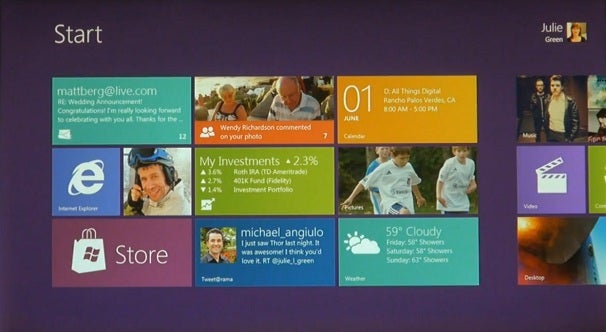
Microsoft showed its first public demo of Windows 8 on Wednesday, and it's not at all like the Windows operating systems you've come to know over the past 25 years. The next version of Microsoft's operating system ("Windows 8" is just a code name) is a radical departure, designed around touch screens.

If this revelation is making you weak in the knees, worry not. Here's a handy FAQ on the early Windows 8 build that Microsoft demonstrated:
What Windows 8 features did Microsoft demonstrate?
Essentially, Microsoft showed how Windows 8 will work on both tablets and traditional PCs. The operating system's home screen is filled with big, touchable panels, like the live tiles in Windows Phone 7, and from there you can tap and swipe your way to other touch-based applications. But underneath that touchy layer is plain old Windows, with a task bar, file manager, app icons--everything.
Swipe across to multitask. (Click to Zoom)
How does the touch interface work?

From the start menu, which shows basic information like time and unread e-mail counts, users swipe upwards to reveal the home screen and its tiles. As with Windows Phone 7, apps can show some information within the tiles--users needn't click on the weather app to see the current temperature, for example. Swiping from the right bezel brings up a menu that can take users from an app back to the home screen.
Users can multitask between open apps by swiping across from the left bezel. And therein lies the coolest-looking feature of Windows 8: When swiping in a new app, users can snap it in place next to the app that's currently running. This allows users to view two apps at the same time--something that no existing tablet OS can do.
Windows 8 Weather App (Click to Zoom)
How will Windows 8 apps work?

Microsoft says it's created a new kind of app for Windows 8 using HTML5 and Javascript, and they're a lot like the apps you'd expect to find on a tablet. A weather app shows the five-day forecast. A news reader displays stories and thumbnail images in big, rectangular panes. Microsoft also showed off Internet Explorer 10, which is optimized for touch. Presumably Microsoft will distribute these apps through its own store--there's a "Store" tile in the version of Windows 8 that Microsoft demonstrated--but the company offered no details.
Legacy apps and new apps can run side by side (Click to Zoom)
What about existing Windows apps, such as Office and Photoshop?

They'll still work. Loading one of these apps will bring up a more familiar version of Windows. According to All Things Digital, classic Windows apps will use "fuzzy hit targeting" to aid finger taps, but they won't be optimized for the touch screen like Windows 8's HTML5/Javascript concoctions. Legacy apps can, however, run side by side with the new Windows 8 apps.
But what about Windows PCs running on ARM chips? Will legacy apps run on those devices?
See our full Windows 8 coverage
It's conceivable that ARM-based Windows devices will be restricted to the touch-centric user interface in Windows 8, but Microsoft hasn't made any announcements on that front. In fact, Microsoft recentlydenied claims made by an Intel executive about which apps will run on ARM-based Windows machines. Intel's Renee James had said to expect at least four versions of Windows for ARM processors, and that none of these versions would be compatible with apps from Windows XP, Vista or 7. Microsoft said these statements were "factually inaccurate and unfortunately misleading," but didn't clarify the matter with any details. In other words, the question is still unanswered.

When's the Windows 8 release date?
Microsoft CEO Steve Ballmer has said that Windows 8 will launch in 2012, but the company hasn't been any more specific than that. Expect more details on Windows 8 in September, when Microsoft will hold the BUILD conference for developers. For now, check out Microsoft's first video of Windows 8 in action.

Top 10 Tech This Week

1. Black 'n' Blue Computer

Is it a time machine? Is it a replicator from Star Trek? No, it's a custom-built PC created by Danish master computer builder Mads Bendtsen (aka DluXe), made of Plexiglas, stainless steel, nylon, and other lovely components.

I'm hoping Mads figures out how to make thousands of these liquid-cooled behemoths packed with state-of-the-art components, gracing the gaming world with their ominous presence.

[via MNPC Tech]


2. Twig

Look what you can do when you make an iPhone docking cable rigid. Suddenly you have Twig, a multipurpose accessory with impressive versatility.


Twig

The Twig lets you stand up your iPhone on a flexible tripod, hold it in place with a portable easel, suspend it from a power outlet with a sturdy stalk, wrap your earbuds around it, or just impress people with your choice of a rainbow of colors.

It's a Kickstarter project that asks for a pledge of $18, or for $20, you get your choice of colors.

Great idea.


3. Sharp Paper-Thin OLED Display

Here's some brand-new technology by Sharp unveiled this week: a new kind of LCD and OLED display panel made of a space-age material called IGZO (indium gallium zinc oxide). The tech is so thin it can be flexible, allowing for paper-thin OLED screens that are highly energy-efficient.

This first flexible screen is the one you see here, measuring 3.4 inches diagonally, with a resolution of 540 x 960 -- almost matching the super resolution of Apple's 640x960 Retina display. Other even-higher resolution screens are on the way, including a 4.9-inch 720 x 1,280 display as well as a 6.1-inch 2,560 x 1,600 screen. Imagine where this is leading!

[via Geeky Gadgets]


4. Electric Aircraft

Since Charles Lindbergh first crossed the Atlantic on a solo flight on May 20, 1927, there's been a lot of technology poured into the aerospace industry. Now we're about to come full-circle, with a grand plan to fly an electric aircraft along that exact same route.

The elaborate plan for the 24-hour nonstop flight consists of using battery packs that can be jettisoned to lessen the plane's weight, as well as an unmanned "mother ship" with which the plane can dock in mid-flight, helping to recharge the electric aircraft as it flies. The goal for the flight is 2014.

[via Gizmag]


5. Ultimate Ears

What do you get when you spend $1999.99 on a pair of earphones? According to Logitech, you get complete customizability and presumably, spectacular sound. That lofty price includes the assistance of a personal service specialist, who uses a "personal reference tuning box" to "guide you through the process of fitting, designing and tuning the Ultimate Ears Personal Reference Monitors."

Once you've precisely adjusted your preferred mix of highs, midrange and lows, Logitech engineers will custom craft your earphones based on those settings. They'll be available this month in New York, Nashville, Irvine California and Los Angeles.


6. Next iPhone

The rumor mill continues to churn about the upcoming iPhone, and now there are pictures and a video depicting alleged front panel parts that give more credence to the oft-repeated assertion that the new Apple handset will have a taller screen.


Next iPhone?

Apple is notorious for its secrecy, so don't be betting any money on this little tidbit of info being entirely accurate. However, there is a preponderance of evidence pointing to a 16 x 9 aspect ratio in the next iPhone, so add this to your educated guesses about what we shall actually see.

[via MacRumors]


7. Guitar Urinal

It's getting more and more fun to be a guy these days, what with urinals like this being invented and deployed in the real world. This one lets you actually play music as you relieve yourself, even letting you become a recording artist, capturing your tinklings for all to enjoy.


Guitar Urinal

"Guitar Pee" includes a mobile app that lets you stream (oops) your recorded masterpiece for anyone whom you can convince to listen.

Will we see this technological wonder in a bathroom near us anytime soon? If you live in Sao Paulo, Brazil, you're in luck. We can only hope this humorous concept will someday spread worldwide.

[via TechEBlog]


8. SpaceX Dragon Returns to Earth

The first commercial voyage to the International Space Station culminated in complete success on Thursday, marking the beginning of a new era for space travel. The SpaceX Dragon splashed down in the Pacific, after delivering its 1,455 pounds of cargo to the space station.

Exciting things are in store for such spacecraft, including soft landings on terra firma instead of splashing into the ocean, transporting humans to the space station and beyond, using even larger rockets and perhaps someday taking off on a manned mission to Mars.


9. NuForce Cube

When I first opened the box containing the NewForce Cube, I was skeptical about how much such a tiny 2-inch (2.3" x 2.3" x 2.36", to be exact) box could accomplish. Once I plugged in my iPhone, I was astonished at the sheer amount of sound emanating from this minuscule device.


NuForce Cube 2

There was some serious sound coming out of this baby, with scintillating and well-defined high frequencies, realistic, warm midrange and even a surprising amount of bass. Sure, it could use a subwoofer to accompany it, but as it is I found it pleasant to listen to, even at its highest volume.


NuForce Cube 3

You can get a special attachment to connect an iPod nano, making it the smallest high-fidelity dock in existence. It's only shortcomings I could find: the inability to use two of them in a stereo arrangement, and the lack of Bluetooth connectivity.


NuForce Cube 4

Here I'm holding two of the Cubes in the palm of my hand, giving you an idea of how small they are.


NuForce Cube 5

I also tested the Cube as a headphone amp, and it makes all the headphones I tested sound a whole lot louder and noticeably better.


NuForce Cube 6

Look at the array of colors from which to choose -- most can be closely matched to the anodized aluminum finish of an iPod nano. And the batteries inside are said to last 8 hours on a charge.

This is one hell of a hotshot speaker, a refined piece of high-fidelity gear that will set you back $119, but it's worth it. Highly recommended.

[from NuForce]


10. Auto Train

If this creative design concept for an Auto Train becomes reality, you won't have to leave your car behind when you want to travel by train. Better yet, you can stay in your car and take in the glorious view, while residing in the familiar surroundings of your own vehicle.


Auto Train 2

Imagine listening to your own tunes, or doing whatever it is you like to do in your car -- and not having to drive -- while watching all that scenery whizzing by.


Auto Train 3

Or, there are seats where you can sit up front or in the back, if you'd like to get out of your car.

Using special stations where cars can be loaded and unloaded, the train has the ability to drop off train sections at specific cities, making the entire process faster because it doesn't need to stop at every single city or town.


Auto Train 4

It looks like designer Marco Gallegos has figured out an important design concept here. Perhaps an idea like this would be enough to get more people interested in train travel, a seriously fuel efficient and severely underutilized transportation mode in the United States.

[via Yanko Design]